
Coupa Spend Guard
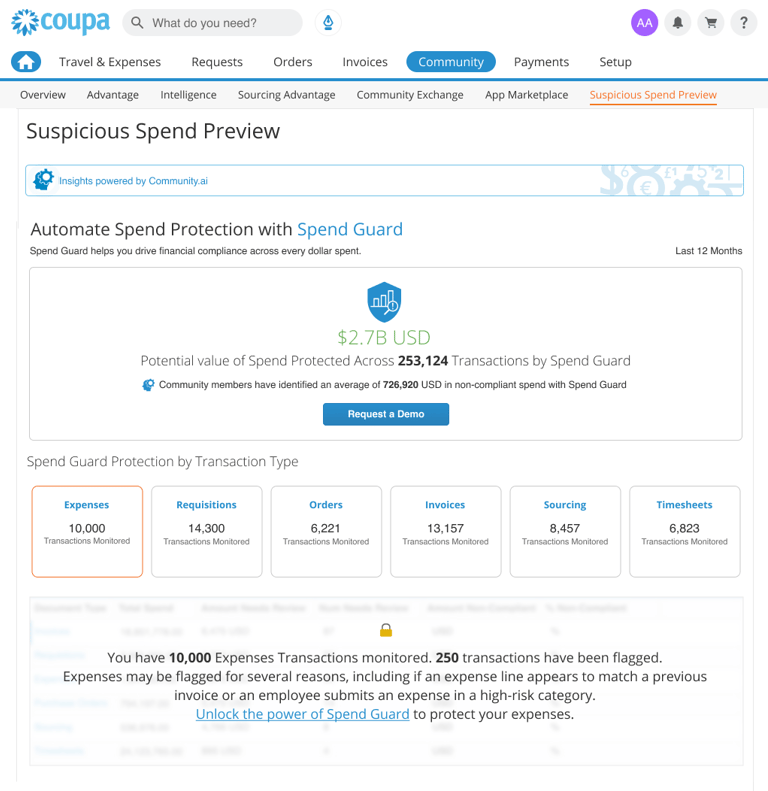
The redesigned preview: spend risk surfaced front and center.
The Problem:
Spend Guard’s value depended on one thing: customers noticing and trusting its AI-generated fraud insights. The preview lived deep in the suite, surfaced generic data, and failed to answer a simple question for procurement and finance leaders:
“Is this worth paying extra for?”
Who I designed for:
Primary: Procurement and finance leaders evaluating whether to add Spend Guard to their plan.
Secondary: Existing customers who had access to the preview but had never meaningfully interacted with it.
They needed a quick, low-risk way to see suspicious patterns in their own spend data and understand the potential impact if they did nothing.
My role:
As the Senior Product/UX Designer on Spend Guard, I led the UX strategy, IA changes, and interface design for the new preview experience, working with PM, data science, and engineering to keep the solution technically feasible and aligned with the pricing/packaging model.
What I did:
Made the preview discoverable
Simplified navigation and renamed entry points so the preview sat alongside other “risk & insights” tools instead of being buried in a secondary tab.
Added contextual links from high-traffic dashboards where customers already reviewed spend anomalies.
Turned raw AI output into a story
Partnered with data science to select a small set of high-signal indicators (e.g., suspicious suppliers, out-of-policy categories, abnormal invoice patterns).
Designed a summary strip that answered, at a glance: “Here’s where your money is at risk today.”
Used progressive disclosure so leaders could drill into a few concrete examples without being overwhelmed by tables or model details.
Aligned the experience with upgrade intent
Framed the preview as “a limited look at what Spend Guard will monitor continuously,” so the UI set expectations without feeling like a hard sell.
Designed an upgrade CTA that appeared only after users had explored their own suspicious spend, keeping the focus on insight first, upsell second.
Pushed back on a premature AI pivot
Argued against replacing the preview with an LLM chat interface. In 2021, a blank prompt in front of finance users would have added friction rather than removed it.
Advocated for a guided experience with charts, clear value hooks, and contextual CTAs instead.
Impact:
Post-launch analytics showed:
Higher discovery of the Suspicious Spend Preview within the Coupa suite.
Longer, deeper engagement with suspicious spend data (more users exploring examples rather than bouncing).
A measurable lift in customers upgrading their plans to include Spend Guard.
Users treated flagged items as starting points for investigation rather than noise.
Quote from a Finance stakeholder: "A simple system, that already within a few weeks uptime has paid back the investment."
What this reinforced for me:
AI features only drive value when people can find them, trust them, and see the business risk in plain language.
In enterprise SaaS, UX is often the bridge between “we have powerful models” and “decision-makers are willing to pay for them.”
This project shaped how I now approach AI-driven experiences in my work and in my book: show the real problem, make the insight unmistakable, then get out of the way so the business decision is easy.
+106%
YoY growth in Spend Guard
customer adoption
$135M
Non-compliant spend flagged
Sales demos
Adopted as a go-to demo for expansion revenue
Suspicious Spend Preview
Turning an invisible AI feature into an upgrade engine
Outcome:
By redesigning the Suspicious Spend Preview, I made Coupa's AI fraud detection easy to find and easy to trust, turning it into a real driver of Spend Guard upgrades.
Visuals
A visual presentation-ready case study version of the project


Social: